W9JAM AT-Service Tool
Looking for AT-Options?
If you searched for AT-Options, AT Options, or the AnyTone band-mode utility, W9JAM AT-Service Tool is an independently developed alternative for supported AnyTone radios. It provides access to supported factory options, band modes, service information, dealer information, profile backup/restore, automatic radio detection, and RDT codeplug mode conversion. With the addition of version 1.5L it now has a native 64-bit Linux app as well as Windows 64-bit versions.
W9JAM AT-Service Tool is not the original AT-Options software and is not a fork of it.
| W9JAM AT-Service Tool v1.5 – Standard Installer Download v1.5 Standard Installer Windows 10/11 x64 – Requires Microsoft .NET 8 Desktop Runtime x64 | W9JAM AT-Service Tool v1.5 – Offline / Self-Contained Installer Download v1.5 Offline Setup Windows 10/11 x64 – No separately installed .NET runtime required |
| W9JAM AT-Service Tool v1.5L – x64 Linux Installer Download v1.5L Linux (x64) Installer Download v1.5L Linux (x64) SHA256 | Previous Version v1.4 Download v1.4 Standard Installer Windows 10/11 x64 – Previous stable release without the RDT Codeplug Converter |
LINUX x64 — Version 1.5L
W9JAM AT-Service Tool v1.5L is the native 64-bit Linux release. It is self-contained and does not require a separately installed .NET runtime.
The included installer detects supported Linux distribution families, installs any missing native libraries using the appropriate package manager, installs the application and desktop-menu entry, and configures persistent AnyTone USB serial-device aliases through udev.
To verify the checksum, download the SHA256 file and save it in the same download folder where the .tar.gz file is, and from terminal within that folder, run:
sha256sum -c W9JAM-AT-Service-Tool-v1.5L-linux-x64.tar.gz.sha256Tested Linux Distributions
- CachyOS
- Arch Linux
- Ubuntu
The installer also includes package-manager support for Debian, Linux Mint, Manjaro, Fedora, RHEL-based distributions, openSUSE, and SUSE-based distributions. These additional distributions have not all been physically tested.
Linux Installation
Extract the downloaded archive, open a terminal in the extracted folder, and run:
chmod +x install.sh uninstall.sh
sudo ./install.sh
After installation, unplug and reconnect the radio. Launch the program from the application menu or run:
w9jam-at-service-toolLegacy Version v1.3
Legacy Windows UI – .NET Framework 4.8
Windows may display a security warning for newly released unsigned software.
Download W9JAM AT-Service Tool only from W9JAM.com
Windows Latest Version: 1.5
Linux Latest Version: 1.5L
Previous Version: 1.4
Legacy Version: 1.3
About Version 1.5 for Windows / Version 1.5L for Linux
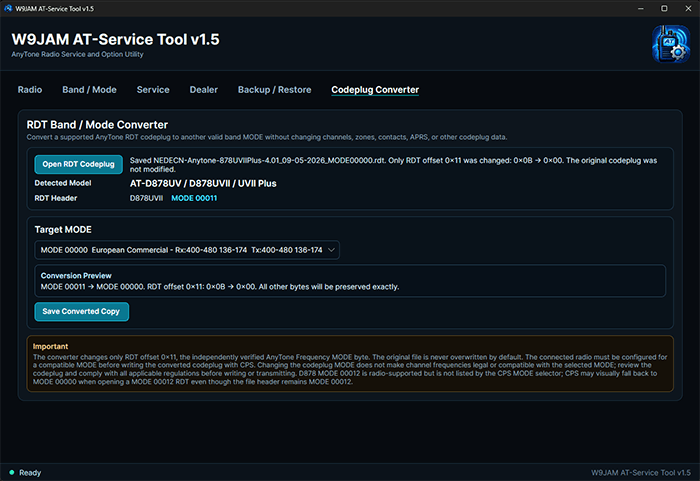
Version 1.5 adds a new RDT Codeplug Converter for supported AnyTone radios while retaining the redesigned interface, radio-reading, writing, service, dealer, backup, restore, and automatic radio-detection features introduced in earlier releases.
The Codeplug Converter can detect the radio model from a supported AnyTone .rdt codeplug, identify the current band/mode setting, and save a converted copy for another supported mode while preserving the remaining codeplug data.
- AT-D168UV
- AT-D578UV / AT-D578UVII
- AT-D878UV / AT-D878UVII
- AT-D890UV
Codeplug conversion has been tested using real populated codeplugs from all four supported radio families. The original RDT file is preserved by default and the converted codeplug is saved as a new file.
Important Codeplug Converter Notes
The Codeplug Converter changes the mode information stored in the RDT file. It does not automatically change the frequencies already programmed into channels. You are responsible for making sure the frequencies in the converted codeplug are valid for the selected mode, radio, license, radio service, and jurisdiction.
The AT-D878 family supports MODE 00012, but that mode is not listed in the manufacturer’s CPS mode-selection menu. When a MODE 00012 RDT is opened, the CPS may visually fall back to MODE 00000 even though the RDT itself retains MODE 00012.
MODE 00014 is intentionally not offered for the AT-D878 family. Testing has shown that operation in that configuration can improperly drive the VHF hardware and may result in radio damage.
The AT-D578 family also supports some modes, including MODE 00012 and MODE 00014, that are not listed in the manufacturer’s CPS mode-selection menu.
Version 1.4 introduced the completely redesigned modern user interface that continues in Version 1.5.
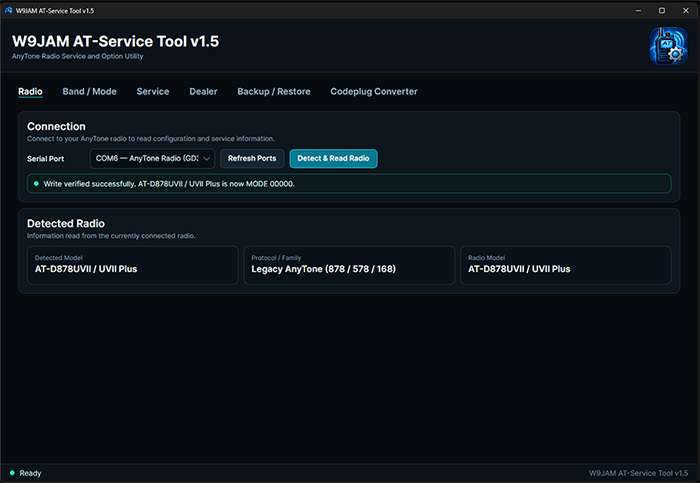
The new version also improves serial-port identification. When a known AnyTone USB interface is detected, the COM-port list can display labels such as:
- AnyTone Radio (GD32)
- AnyTone Radio (STM32)
- AnyTone Radio (AT32)
For Linux it will list:
- /dev/anytone890
- /dev/anytone168
- /dev/anytone578
Please note that the 578 and 878 can share the same serial chip, so that is why the udev rules were set the way they are. *may revise that one in a future release*
The USB identifier is used only as a convenience to help identify likely radio ports. The software still performs its own radio detection and verification before determining the connected radio model.
W9JAM AT-Service Tool includes profile backup and restore, built-in safety checks, changed-block writing, and automatic readback verification after supported changes are written to the radio.
This utility is not CPS software and is not intended to replace AnyTone Customer Programming Software.
Current Interface Screenshots
Redesigned interface Now with Codeplug Converter!
Automatic AnyTone USB/COM identification
Important Warning
You are responsible for ensuring that any changes made to your radio or codeplug comply with all applicable laws, regulations, license conditions, and operating requirements in your jurisdiction.
Changing a radio’s Mode/Band settings may also affect the manufacturer or dealer warranty. Some dealers may consider Mode/Band changes grounds for voiding a warranty.
W9JAM is not responsible for warranty issues or radio damage resulting from unsupported, inappropriate, or improper configuration changes made with this software.
Supported Radios
- AnyTone AT-D168UV
- AnyTone AT-D578UV / AT-D578UVII
- AnyTone AT-D878UV / AT-D878UVII
- AnyTone AT-D890UV
Automatic radio detection has been hardware-verified on the AT-D168UV, AT-D578UVII, AT-D878UVII, and AT-D890UV.
Support for the AT-D590UV and AT-D570UV is planned once those radios are officially released and available for direct testing.
W9JAM AT-Service Tool may also work with radios based on supported AnyTone platforms, including privately labeled or dealer-rebranded models where the underlying hardware, codeplug format, and protocol remain compatible.
Features
- Modern redesigned user interface
- Automatic radio detection on supported models
- Identification of known AnyTone USB/COM interfaces
- RDT Codeplug Converter for supported radio families
- Automatic RDT radio-model detection
- Current codeplug mode detection
- Radio-specific codeplug mode selection
- Non-destructive Save As conversion that preserves the original RDT by default
- Built-in safeguards for known unsupported or unsafe radio modes
- Built-in safety checks before writing changes
- Read factory and service information from supported radios
- View and change supported band modes and factory options
- Read and edit supported programming, service, and dealer information
- Back up the radio’s complete raw 256-byte options/service profile
- Restore backups only to a verified matching radio
- Write only changed memory blocks where supported
- Automatic readback verification after writes
- Full 256-byte verification after backup restore
- Internal radio serial number remains read-only
- Factory identity information is preserved during normal edits
Official downloads and updates are provided through W9JAM.com.
If you received the program from another source, check this page for the current official release.
Requirements
Version 1.5 Standard Installer
- Windows 10 or Windows 11 x64
- Microsoft .NET 8 Desktop Runtime x64
- Compatible USB programming cable or supported USB connection
The installer checks for the Microsoft .NET 8 Desktop Runtime x64. If it is not detected, Setup provides access to Microsoft’s official .NET 8 download page.
Version 1.5 Offline / Self-Contained Installer
- Windows 10 or Windows 11 x64
- Compatible USB programming cable or supported USB connection
- No separate .NET installation required
Version 1.5L Linux Installer
- x64 based Linux install
- Compatible USB programming cable or supported USB connection
- No separate .NET installation required
Tested Linux Distributions
- CachyOS
- Arch Linux
- Ubuntu
The installer also includes package-manager support for Debian, Linux Mint, Manjaro, Fedora, RHEL-based distributions, openSUSE, and SUSE-based distributions. These additional distributions have not all been physically tested.
Version 1.4 Previous Release
Version 1.4 remains available as the previous stable Windows 10/11 x64 release without the RDT Codeplug Converter.
Version 1.3 Legacy Build
- Compatible Windows system
- .NET Framework 4.8
- Compatible USB programming cable or supported USB connection
Important Notice
This software can modify factory, service, dealer, band-related, and codeplug mode settings for supported radios.
The user is responsible for complying with all applicable local, state, federal, international, and other governmental regulations and for ensuring that selected settings are appropriate for the radio and intended use.
Before applying a band or mode change, confirm that the selected configuration is lawful for your country, license class, radio service, and intended operating frequencies.
Independent Project
W9JAM AT-Service Tool is independently developed and is not affiliated with or endorsed by AnyTone or the authors of the original AT-Options software.
AnyTone and associated product names are trademarks of their respective owners.
License
Use of W9JAM AT-Service Tool is subject to the included software license agreement.
The license is displayed during installation and must be accepted before the program can be installed.
About the Project
Development of W9JAM AT-Service Tool began on September 5, 2026 as part of my work in amateur radio, software development, radio programming, and technical experimentation. The goal is simple: build useful tools that help the amateur radio community solve real problems.